
Complete CAD-based Thermal Engineering Tool Suite
C&R Thermal Desktop® enables thermal engineers to create models that range from small components to complete systems. It is general-purpose, which means it is suitable for everything from commercial submarine components to planetary exploration systems. Finite difference and finite element objects are combined with environment definitions in AutoCAD’s 3D design environment. Thermal Desktop creates the node and conduction network, launches SINDA/FLUINT for the solution, and provides post-processing results. Thermal Desktop clearly shows our dedication to giving users the very best in thermal and fluids analysis. It allows you to handle the engineering judgment while it takes care of the grunt work.
Thermal Analysis from Beginning to End
Thermal Desktop includes all aspects of model creation. Built-in finite difference, finite element, and lumped capacitance objects can be combined in any configuration. Thermal-specific objects such as contact conductance, insulation, heat loads, and heaters can be added to model anything from automotive components to manned spacecraft.
Thermal Desktop provides full parameterization using variables and arbitrarily complex expressions as input rather than hardwired numbers. These variables, called Symbols, allow models to be rapidly manipulated with a few keystrokes, meaning updating or maintaining the model is easy, as is performing sensitivity studies and investigating what-if scenarios. This also provides access to SINDA/FLUINT’s Optimization and Reliability modules and automatic model correlation.
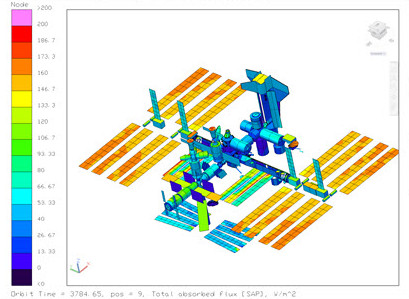
Once the model is ready, Thermal Desktop launches SINDA/FLUINT, and shows the results in a post-processing window. You can visualize the temperatures and heat flows to understand all the nuances of your thermal system. With the optional modules RadCAD and FloCAD, you can see environmental heat rates, pressures, flow rates, and much more. Powerful post-processing tools include automatically determining maximum and minimum temperatures, plotting component temperatures, exporting results to a file for Excel, and even creating a video of a temperature plot through time.
Two seamlessly integrated modules are available with Thermal Desktop. RadCAD calculates radiation heat transfer between components within the model and between the model and the environment. FloCAD adds the capability to model flow circuits, including fans and convective heat transfer. These fluid models integrate with the thermal models and are solved together, enabling accurate modeling of devices such as radiator systems or cryogenic lines.
Thermal Desktop's capabilities can be expanded even more by adding TD Direct, our advanced meshing software that is easily integrated into Thermal Desktop. TD Direct is ideal for complex geometry (in virtually any CAD format), rapid design interations, fluid volumes for Compartments, pipe centerlines, and many other functions.
Thermal Desktop is used by thermal engineers around the globe. It is not a compromise of many disciplines rolled into a single product; this is nothing but the very best of thermal and fluids analysis. Should you need help learning our software, you will find CRTech is staffed by thermal and fluids engineers who understand your needs and concerns.
Top-level Thermal Modeling Features
- Easily take your model from geometric definition to temperatures using the Case Set Manager
- Use any combination of units
- Easily locate and edit all model objects in the Model Browser
- Complete geometric postprocessing of thermal data - temperature, capacitance, heating rates, etc.
- Fully integrated with the EZXY® Plotting Utility
- Integrated with SINDA/FLUINT including the Advanced Design Module
- Multi-processor support for radiation calculations and optionally for large SINDA solutions
- Ability to launch multiple cases real time or in batch mode
- Tools to facilitate making movies (avi files) for postprocessing or orbital definitions
- Specify thermocouple locations, test data files, and automatically calibrate your model to test
Thermal-structural Geometry
- Finite difference surfaces such as cones, cylinders, rectangles, spheres, paraboloids, polygons, ellipsoid, elliptic cone, elliptic cylinder, and offset paraboloid
- Finite difference solids such as bricks, cylinders, and spheres
- Finite elements - triangle, quadrilateral, tetrahedron, wedge, and bricks
- Curved finite elements when used with TD Direct®
- Edge node conics to span entire geometry of cones, cylinders, rectangles, spheres, or paraboloids
- Built-in mesher allows creation of finite elements based on AutoCAD® surfaces, regions, or solids
- Traditional finite element functions such as showing free edges, merging coincident nodes, hiding interior solid faces, and surface-coating capabilities
Thermal Model Building Tools
- Thermostatically-controlled heater objects
- Built-in natural convection correlations
- Thermoelectric cooling and power generation devices
- Many tools to develop and integrate user logic in thermal model
- Arbitrary nodes and conductors, including area-based conductors to model convection
- Insulation applied to objects for modeling Multi Layered Insulation (MLI), single-material, or mult-material insulators
- Boundary condition mapping of
- Time- and temperature-dependent heat fluxes from CFD results
- Convection coefficient and temperature pairs from CFD results
- Insulation thickness for simple or complex thermal protection systems (TPS)
Thermophysical Property Database
- Constant and temperature-dependent capacitance and conductivity
- Supports anisotropic thermal conductivity
- Structural properties to support waterhammer analysis
- Thermoelectric properties for modeling TECs and TEGs
- Calculation of laminate and aggregate bulk properties
Import and Export Capabilities (see also TD Direct®)
- TRASYS import and export
- Nevada import
- TSS import and export
- STEP-TAS model translation available through a third-party app
- Iceboard import for printed circuit board design
- IDEAS FE and FD import
- FEMAP import
- NASTRAN import and mesh export
- ANSYS import
- NASTRAN, ANSYS, and ABAQUS temperature mapping export
- STEP-209 import and export
- CAD geometry import
- ACIS
- Autodesk Inventor
- CATIA V4 and V5
- IGES
- Parasolid
- Pro/ENGINEER
- SolidWorks
- STEP
- NX
Application Programming Interface
- OpenTD: Application Programming Interface (API) for Thermal Desktop
- API Brochure